

Types of UV Printers: A Complete Comparison Guide
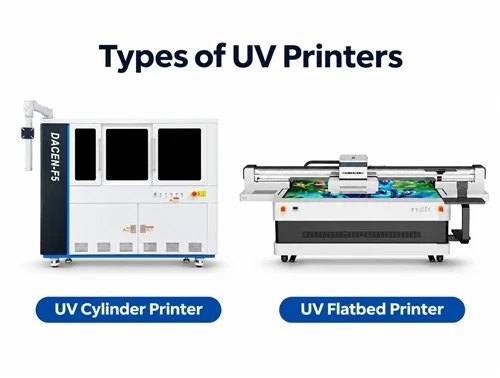
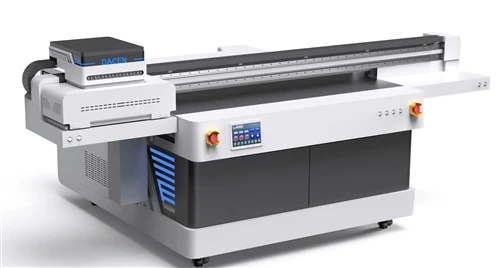
The two main types of UV printers are flatbed and cylindrical models. A cylindrical UV printer is usually the better fit for full-wrap graphics on bottles, tumblers, and round containers. A flatbed UV printer suits signs, rigid panels, packaging prototypes, and promotional products with flat or relatively level printing surfaces. For a business producing both, a flatbed with a compatible rotary attachment may be a practical starting point.
The choice depends on your product mix, required output, and cost per saleable item. Print resolution and purchase price tell only part of that story.
This guide compares how the two systems work, where print quality problems occur, and what to test before buying.
How cylindrical and flatbed UV printers work

A cylindrical UV printer holds an object in a rotating fixture and deposits UV-curable ink as the surface turns. This arrangement allows graphics to wrap around a bottle, cup, or container.
Some dedicated systems use helical printing, which combines rotation with movement along the object's axis. Support for tapered or contoured products depends on the machine's fixtures, software, and permitted surface geometry. Helical printing alone does not establish compatibility with every curved object.
A flatbed UV printer supports the substrate on a stationary or moving table while the printhead assembly travels across the printing surface. Large sheets commonly use vacuum hold-down systems. Small products often need jigs to keep each item in position.
The practical distinction is how the product moves relative to the printheads. That affects fixture design, artwork placement, loading time, and production capacity.
Cylindrical UV printer vs flatbed UV printer at a glance
| Comparison | Cylindrical UV printer | Flatbed UV printer |
|---|---|---|
| Product positioning | Object rotates in a chuck, mandrel, or other fixture | Substrate rests on a printing table or in a jig |
| Main size limits | Supported diameter, product length, printable length, taper, and weight | Printing area, object clearance, and table load capacity |
| Typical applications | Bottles, tumblers, cans, tubes, and cosmetic containers | Signs, acrylic panels, boards, gifts, and packaging prototypes |
| Ink options | CMYK, white, and clear or varnish; other options depend on configuration | CMYK, white, clear or varnish, and primer, depending on configuration |
| Curing | Commonly UV-LED curing during printing | Commonly UV-LED curing during printing |
| Equipment formats | Compact units through industrial production systems | Desktop units through large-format systems |
| Main quality concerns | Wrap alignment, rotational accuracy, and changing surface geometry | Banding, layer registration, surface height, and positioning |
| Production flexibility | Suited to repeated decoration of compatible round products | Suited to varied flat products and multiple items arranged on a bed |
| Main limitation | Generally unsuitable for large flat sheets | Full-wrap cylindrical printing requires compatible rotary hardware |
Materials and ink adhesion
Product shape determines how the printer holds and moves an object. Surface chemistry determines how well the ink wets and bonds to it.
Cylindrical UV printers commonly decorate glass bottles, aluminum cans, stainless-steel tumblers, cosmetic containers, and selected plastic tubes. These applications include personalized drinkware, beverage packaging, and promotional merchandise.
Flatbeds are commonly used for corrugated polypropylene signs, acrylic sheets, aluminum composite panels, PVC foam boards, wood, and rigid packaging prototypes.
In both cases, a product fitting inside the machine does not establish that the ink will adhere properly.
Surface preparation depends on the material
Polyethylene and polypropylene have low surface energy and may need treatment before printing. Depending on the plastic formulation, ink, and intended use, suitable options may include primer, flame, corona, or plasma treatment.
Glass, metals, and coated metals may also need a compatible primer or other preparation.
White ink improves opacity and provides a base for color on dark or transparent products. It does not replace cleaning, pretreatment, or a suitable ink-and-substrate combination.
Before approving a process, test the same material and surface finish that you intend to use in production.
Check the rotary fixture as carefully as the printer
For bottles and tumblers, confirm:
Supported diameter, length, weight, and taper.
Chuck or mandrel compatibility with the product.
Access to the intended printing area.
Fixture adjustment and changeover requirements.
Whether loading and unloading use one station or several.
Tapered products need compatible fixturing and artwork handling. Ask the supplier to demonstrate your actual cup or bottle rather than relying on a general claim that the machine supports tapered printing.
Print quality: What to inspect on the finished product
Neither printer type has an automatic advantage in every application. Each has different positioning and registration challenges.
On bottles and tumblers
Accurate rotary printing depends on the relationship between rotation, ink placement, and artwork dimensions.
Incorrect calibration can stretch or compress a design around the circumference. Synchronization errors can leave a gap, overlap, or visible transition where a full-wrap image meets itself.
Tapered and contoured products add difficulty because surface geometry changes along the printing area. Compatible systems address this through fixture positioning, artwork compensation, and other model-specific controls.
When reviewing cylindrical samples, inspect:
- The full-wrap join.
- Fine text near the edges of the printing area.
- White-ink coverage beneath color.
- Gradients and large solid-color areas.
- Registration around clear or varnish effects.
- Consistency between early and later pieces in a production run.
A sample should demonstrate the artwork and coverage you plan to sell.
On flat products
Large flatbed prints can reveal banding, uneven color density, misalignment between white and CMYK layers, or inconsistent finishes.
When several products share a jig, check placement across the whole bed. A good result on one item does not establish that every position will produce the same alignment.
Use fine lettering, solid colors, gradients, and layered effects in the evaluation artwork. Inspect samples under the lighting and handling conditions your customers will encounter.
Advertised DPI is useful specification data, but it cannot establish finished print quality or durability on its own.
Production speed: Measure the complete cycle
Flatbed productivity is often quoted in square feet or square meters per hour. Cylindrical printer output is often quoted in pieces per hour or seconds per item.
Those figures describe different things and should not be compared directly.
For a flatbed, record how many products fit on the bed, the print time for that arrangement, and the time needed to load and unload it. Include any repositioning or downstream cutting.
For a cylindrical printer, time fixture loading, alignment, printing, unloading, and handling. Note whether any of these steps overlap.
Space, utilities, and handling
Check the complete route through the shop, including material preparation, printing, inspection, and packaging.
Confirm machine access, floor loading, service clearance, ventilation, and electrical requirements. Some printers accept 100–240 V input; other installations may require dedicated circuits or three-phase power.
Use the selected machine's installation requirements and nameplate data when planning the workspace.
Purchase price and total cost of ownership
The purchase price is one part of the investment. Equipment with different printing areas, fixtures, automation, and service arrangements can have very different operating costs.
Promotions, regional pricing, accessories, and service packages can change the amount payable. Request an itemized quotation for the installed configuration.
What to include in the operating budget
Account for ink, primer, cleaning fluids, fixtures, operator labor, maintenance, replacement printheads, UV curing components, and service visits.
Downtime also affects cost. Delayed orders, rejected products, and time spent waiting for parts can outweigh an initial saving on the machine.
Ask the supplier about technical support coverage, spare-parts availability, maintenance requirements, and service responsibilities. Include future fixture needs and expansion options in the comparison.
Resale value depends on factors such as maintenance records, printhead condition, continued parts availability, and service support. In some businesses, improved fixtures or a second printer may be more useful than replacing an existing machine.
What to test before buying a UV printer
A useful demonstration should establish whether a proposed configuration can produce your products consistently.
Prepare the buying requirements
Give each supplier the same information:
- Your five most common products, including materials and dimensions.
- Required artwork, coverage, and finishing effects.
- Expected daily and monthly quantities.
- Available workspace and electrical supply.
- Budget for equipment, installation, fixtures, and maintenance.
This makes the quotations easier to compare and reduces uncertainty about what each configuration includes.
Agree on a sample-testing procedure
Use actual production substrates and artwork. Record the printer configuration, ink, pretreatment, print mode, and test conditions.
During the trial:
Inspect color appearance, fine detail, layer registration, and wrap alignment.
Check ink adhesion using an agreed method suitable for the substrate.
Evaluate rubbing, alcohol exposure, abrasion, and weathering where relevant to the application.
Run a sustained production trial, ideally covering a full shift for a volume-production purchase.
Record accepted output, rejects, operator time, cleaning, and changeovers.
Agree on acceptance criteria before testing so both parties assess the samples against the same requirements.
Understand what an adhesion test proves
ASTM D3359-23 describes tape-test methods for rating coating adhesion, with a scope centered on metallic substrates. The standard discusses use on nonmetallic materials but notes limitations in the supporting precision and bias data.
Choose the method with the supplier or testing specialist according to the substrate and coating system.
A tape-test rating alone does not establish dishwasher resistance or long-term outdoor durability. Those claims need application-specific testing.
Which UV printer should you choose?
Choose a dedicated cylindrical UV printer when bottles, tumblers, and round containers account for most of your work and repeated full-wrap printing is a regular production requirement.
Choose a flatbed UV printer when signs, rigid panels, packaging prototypes, and varied promotional products dominate your orders.
For a smaller business with mixed work, evaluate a rotary-compatible flatbed. Confirm its product limits and changeover process before assuming it can cover every application.
For a growing operation, compare the capacity gained from better fixtures, a second printer, or separate dedicated systems. Base the decision on your expected product mix and cost per accepted piece.
Discuss your products with DACEN
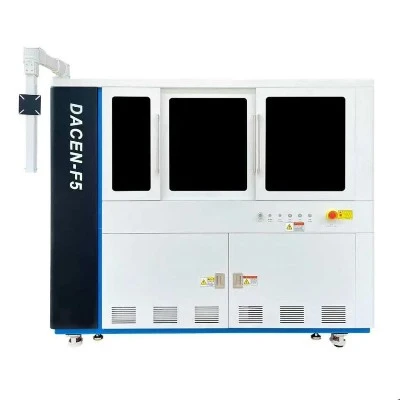
DACEN's sample-printing and material evaluation process allows buyers to discuss product geometry, fixtures, ink adhesion, and print coverage before selecting a machine.You can explore DACEN cylindrical UV printers or contact us to discuss a demonstration and sample test.
Frequently asked questions
What are the main types of UV printers?
The two main types of UV printers are flatbed and cylindrical models. Flatbed UV printers are engineered for rigid, flat substrates-such as acrylic, glass, metal, wood, and PVC boards-using a vacuum bed to hold thick or oversized sheets steady for high-precision output. Conversely, cylindrical (rotary) UV printers utilize specialized rotating jigs for seamless 360-degree printing on curved items like insulated tumblers, wine bottles, and cosmetic tubes. Selecting the right configuration enables manufacturers to scale from industrial signage and architectural panels to high-margin custom drinkware and packaging, all with instant UV-LED curing.
What does a UV flatbed printer produce in a sign shop?
Typical applications include acrylic displays, aluminum composite signs, PVC boards, retail displays, and other rigid graphics.
Which UV printer is better for a small business?
A compact flatbed can be useful for varied promotional products. A business centered on customized bottles or tumblers should evaluate a dedicated cylindrical system. The better choice depends on repeat orders, production time, and contribution per product.
How should UV ink adhesion be tested before purchase?
Print on actual production materials using the proposed ink and pretreatment. Agree on suitable adhesion and durability tests, document the conditions, and define acceptable results before approving the samples.