

Benefits of Direct-to-Can Printing: A Practical Guide for Beverage Brands

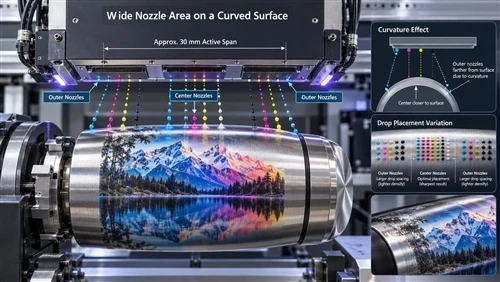
Direct-to-can printing applies graphics straight onto the aluminum can using advanced UV flatbed printer technology, with no pressure-sensitive label and no shrink sleeve in between. Unlike traditional packaging methods that require additional labeling materials, UV flatbed printers enable brands to print high-resolution, full-color designs directly onto curved or cylindrical cans with excellent adhesion and durability. For beverage brands, that single change affects five things at once: shelf appearance, packaging cost structure, launch speed, durability, and recyclability.
This guide walks through each of those benefits with the numbers you need to evaluate them, and is equally honest about where direct printing is the wrong choice.
The technology matters most to operations running many SKUs in modest quantities - craft breweries, cold brew and RTD coffee brands, sparkling water and functional beverage startups, energy drink launches, and contract packers serving all of the above.
1. Print Quality and Color Consistency
Because the artwork is imaged onto the can body itself, there is no label to wrinkle, bubble, lift at the edges, or drift out of alignment. The graphic becomes part of the package rather than a material applied to it, and the metallic aluminum can be left exposed to act as a design element in its own right.
Current production systems typically deliver:
600–1200 dpi resolution
Variable droplet sizes for smoother gradients
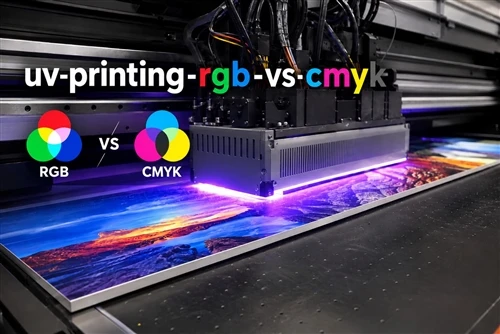
Wide CMYK gamut, with white ink available as an underbase
Legible text below 4 pt
Scannable barcodes and QR codes
Registration accuracy around ±0.1 mm

How color consistency is controlled
Brand color is where digital printing used to lose the argument, and it no longer does - provided the supplier runs a real color management workflow: ICC profiles, spectrophotometer measurement, digital proofing, press calibration, and closed-loop correction between batches.
Ask a supplier what color tolerance they hold in production. Common commitments are ΔE ≤ 2.0 for premium brand assets and ΔE ≤ 3.0 as a general production ceiling. A ΔE of 2 is roughly the point at which a difference stops being obvious side by side, so a supplier who will not state a number is telling you something.
The other question worth asking is what happens across machines. If your volume is split over multiple printing lines, machine-to-machine calibration is what keeps this week's cans matching the ones you printed six months ago.
2. Cost Structure and Minimum Order Quantities
Direct printing does not make packaging universally cheaper. It moves cost from setup to per-unit, which is a large advantage for short runs and a disadvantage for long ones.
There are no printing plates, no label inventory, and no label application step. What remains is ink, surface preparation, equipment depreciation, labor, coating, inspection, and packing.
| Production Volume | Labels or Sleeves | Direct-to-Can |
|---|---|---|
| Under 5,000 cans | Setup and minimums dominate | Usually lowest total cost |
| 10,000–50,000 cans | Competitive | Competitive - depends on ink coverage |
| 100,000+ cans, stable artwork | Often lower | Rarely the cheapest option |
Note that the comparison must include the costs buyers routinely leave out of a label quote: storage, label application labor, applicator maintenance and spares, misapplied labels, and - usually the biggest line - obsolete stock written off after an artwork change.
Typical minimums and lead times
- MOQ from 500–2,000 cans, with prototype quantities often available in the dozens
- Standard lead times of 7–15 business days
- Rush capacity for promotional and event work
These are an order of magnitude below traditional pre-printed can minimums, which is the practical reason a 500-can seasonal release is possible at all.
For per-can figures, capital investment ranges, and payback scenarios, see the full direct-to-can cost breakdown. If your volumes are large and your artwork is stable, read the offset lithography comparison first.
3. Production Speed and SKU Flexibility
The operational benefit is changeover time. Switching artwork means loading a file and verifying color, not making plates and running make-ready sheets.
| Metric | Typical Value |
|---|---|
| Throughput | 1,500–6,000 cans/hour |
| Changeover between designs | 5–20 minutes |
| New artwork setup | Minutes |
| Startup waste | 1–2% |
A standard production sequence runs: artwork submission, preflight, proof approval, sample can, surface preparation, printing, UV curing, protective coating, inspection, pack out.
One planning caveat: printer speed has to be matched to your filler. A line filling 250 cans per minute behind a printer running 120 cpm makes the printer the bottleneck, and buffer conveyors or parallel print capacity are usually a cheaper fix than a faster press.
Where this flexibility pays off
- Seasonal and holiday releases
- Brewery collaborations and taproom exclusives
- Regional or retailer-specific artwork
- Market tests before committing to a national run
- Variable data - serialization, promotional codes, batch tracking
See best applications for direct-to-can printing for volume-by-stage planning guidance.
4. Durability, Adhesion, and Food Safety
Printed graphics have to survive the cold chain, condensation, ice buckets, transit, and handling. Direct printing achieves this through UV-curable or UV-LED inks formulated for aluminum, applied over a prepared surface and sealed under a protective varnish.
Surface preparation
Adhesion is decided before any ink is laid down. Typical steps are cleaning, oil removal, surface activation or corona treatment where required, and primer or adhesion promoter on specific substrates.
Tests to request
| Test | What it proves |
|---|---|
| Cross-hatch adhesion | Ink bonding to the substrate |
| Rub and abrasion resistance | Shipping and retail handling |
| Condensation cycling | Refrigerated display performance |
| Freeze-thaw cycling | Cold-chain distribution |
| Dent resistance | Graphic integrity after deformation |
| Pasteurization or retort validation | Required only for those processes |
| Pasteurization or retort validation | Required only for those processes |
Compliance documentation
Decoration sits on the exterior of the can, and the beverage is protected by the can's internal food-contact coating. That does not remove the supplier's obligation to document what they are using. Request ink and coating technical data, Safety Data Sheets, migration testing where applicable, and declarations covering applicable FDA indirect food-contact requirements.
5. Sustainability and Recyclability
Direct printing removes materials from the packaging system rather than adding them: no shrink sleeve, no facestock, no adhesive, and no silicone release liner. Liner waste is worth singling out, because most of it cannot be recycled through conventional municipal systems.
| Decoration Method | Added Material | Recycling Simplicity |
|---|---|---|
| Direct-to-can | Ink and varnish only | Excellent |
| Pressure-sensitive label | Facestock, adhesive, liner | Good |
| Shrink sleeve | Full plastic sleeve | Moderate, infrastructure dependent |
In recycling, printed inks are burned off during thermal decoating before remelting, and modern secondary aluminum furnaces are built to handle them. Labels and sleeves can introduce adhesive residue and polymer contamination that complicates the same process.
Two honest qualifications. First, aluminum production dominates the carbon footprint of a can; decoration is a small share of the total, and the difference between methods matters most to brands already buying high recycled-content aluminum. Second, direct printing's environmental advantage depends on equipment utilization - an underused press spreads its fixed energy consumption across fewer cans.
For functional units, system boundaries, and a full lifecycle comparison against labels, see the dedicated analysis.
When Direct-to-Can Printing Is Not the Right Choice
Direct printing is the weaker option when:
- You run high volumes of one stable design - offset-printed cans win on unit cost above roughly 250,000–500,000 cans
- The design requires seamless 360° coverage with dramatic full-bleed photography, where shrink sleeves still have the edge
- You need embossing or heavy tactile effects, which require secondary finishing
- Your product goes through retort processing and your supplier cannot show validation data
- You are buying equipment on low projected utilization, which stretches payback out for years
A supplier who cannot tell you where their process loses is not a supplier worth trusting on where it wins.
How to Request a Sample Run
Start with a pilot before committing to full production. A standard quotation and sampling sequence:
- Submit artwork as high-resolution vector files with correct color profiles and seam-safe layouts.
- Specify can size, finish, white ink requirement, and estimated annual quantity.
- Review the digital proof and pricing.
- Approve a physical printed sample can, evaluated under retail cooler lighting rather than office light.
- Confirm production schedule and delivery.
Sample runs of 500–2,000 cans with 7–15 business day lead times are common. Ask for durability test data on your actual artwork and substrate, not on a generic sample.
Summary
Direct-to-can printing earns its place when your packaging problem is variety, speed, and inventory risk rather than raw unit cost at scale. It delivers label-free premium appearance with tight color control, minimums low enough to make a 500-can release viable, changeovers measured in minutes, durability validated by standard adhesion and cycling tests, and a simpler recycling stream. Above a few hundred thousand identical cans, conventional pre-printed cans remain cheaper - and the right answer is usually to know exactly where your own break-even sits.
FAQ
What are the main advantages of direct-to-can printing over labels and shrink sleeves?
It eliminates separate label materials, produces a premium integrated appearance with the aluminum available as a design element, allows artwork changes in minutes without plates, removes label inventory and application labor, and keeps the package a single primary material for recycling.
How does direct-to-can printing help craft breweries launch faster?
With no plates to make and no label stock to order, a brewery can produce a seasonal, collaboration, or event-exclusive release at a few hundred to a few thousand cans, typically within 7–15 business days, and write off nothing when the design changes.
What are the disadvantages of digital direct-to-can printing?
Unit cost stops being competitive at high volumes with unchanging artwork, seamless full-wrap photographic coverage is harder than with shrink sleeves, embossing requires secondary processes, and consistent output depends on disciplined color management and regular printhead maintenance.
What inks are used, and do they meet U.S. food-contact requirements?
UV-curable and UV-LED inks formulated for aluminum are standard. The decoration is applied to the can exterior, but suppliers should still provide migration data, Safety Data Sheets, and declarations addressing applicable FDA indirect food-contact requirements.
How durable is direct-to-can print against scratches, condensation, and freezing?
Properly cured and coated prints perform well in cross-hatch adhesion, rub resistance, condensation cycling, and freeze-thaw testing. Request results from these specific tests rather than a general durability claim.
What is the typical minimum order quantity for direct-to-can printing?
Commercial minimums commonly start at 500–2,000 cans, with prototype quantities sometimes available in the dozens - substantially lower than the 100,000+ typical of pre-printed cans.
Does direct-to-can printing affect aluminum recyclability?
Printed inks are removed during thermal decoating before remelting, so directly printed cans stay within the normal aluminum recycling stream without a label removal step. Shrink sleeves and some labels introduce materials that can complicate sorting and add contamination.